Get started with TXOne-Studio
Control your IK Multimedia TONEX ONE pedal from a supported desktop or Android browser. Browse its stored presets, edit effects, and set tempo using a USB data connection.
TONEX® and TONEX ONE are trademarks of IK Multimedia Production Srl. TXOne-Studio is an independent project and is not affiliated with, endorsed by, sponsored by, or associated with IK Multimedia.
Edit TONEX ONE in a desktop browser
Desktop Chrome has been tested with this app. Other desktop browsers need compatible Web Serial support.
- Connect your powered TONEX ONE to your computer with a USB data cable.
- Close the official TONEX Editor, Librarian, and any other app using the pedal.
- Open TXOne-Studio and press Connect pedal.
- Select the pedal’s serial port in the browser prompt. Wait for its stored presets to appear.
Control TONEX ONE from Android
Android Chrome has been tested. Your device must support USB host/OTG connections, and the browser must support WebUSB. Not every Android browser offers the required USB access.
- Use a USB data cable and an OTG-capable adapter or connection to attach your powered pedal to your Android phone or tablet.
- Close any other app using the pedal, then open this site in Chrome.
- Press Connect pedal, choose the TONEX ONE USB device, and allow access.
- Wait for the preset list to finish loading.
Switch presets and edit effects
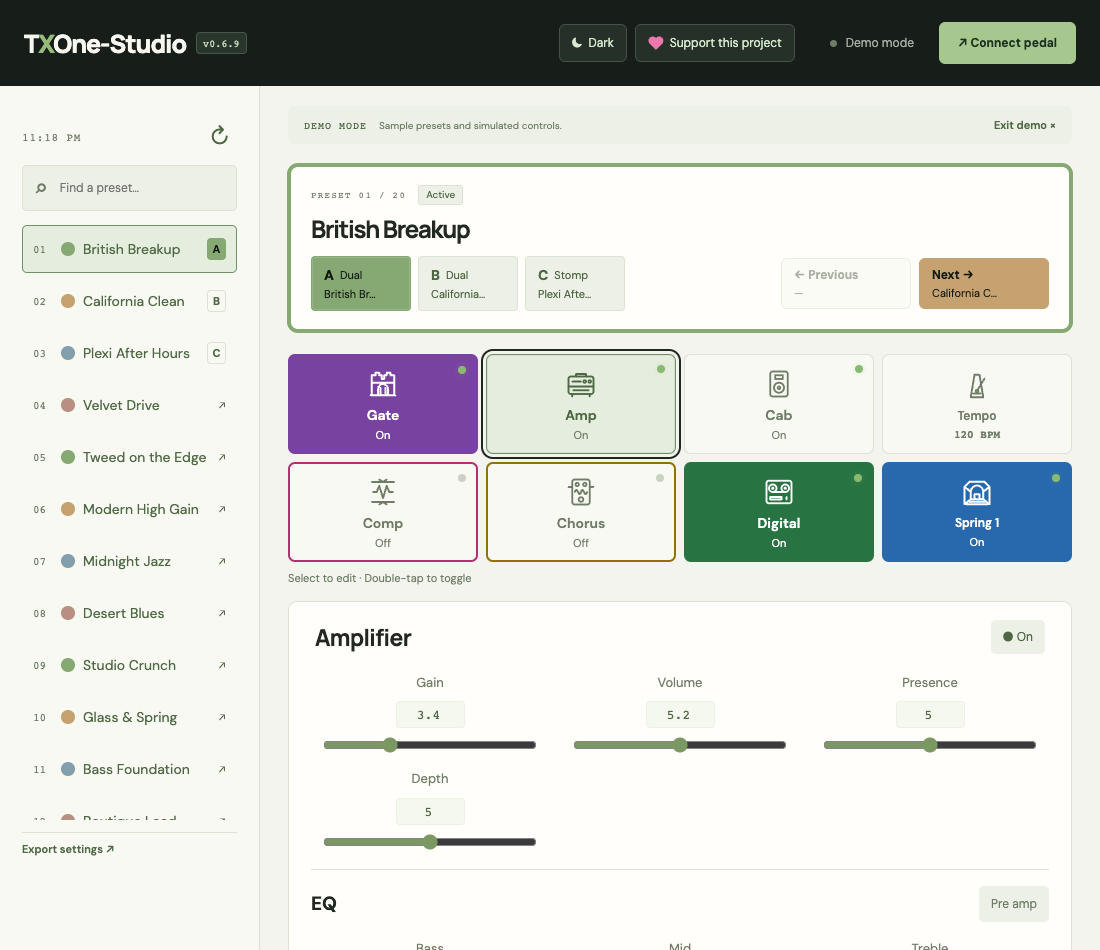
- A/B/C: select the active slot. A and B are the Dual slots; C is the Stomp slot. Slot buttons show a shortened preset name, and the preset list shows its assigned slot letters.
- Preset list: choosing a preset automatically loads it into the selected slot. Previous and Next follow the stored preset order.
- Effect cards: select a card to edit its parameters. By default, double-click or double-tap a card to turn its effect on or off. Choose Single tap under Settings → Activation method if preferred. Modulation, Delay, and Reverb cards show the selected effect type.
- Amp and EQ: EQ is inside the Amp parameter view and remains active when the Amp is off.
- Values: sliders move in whole steps. Enter decimals directly in value boxes where supported.
- Routing: the Pre amp/Post amp button changes where the effect sits in the signal path.
Global settings
Use Settings in the bottom navigation for Master volume (0–10), Input trim (−15 to +15 dB), Tuning reference (415–465 Hz), Global bypass, Global cabinet bypass, and Direct monitoring. Global cabinet bypass disables cabinet simulation across presets. Changes are read back for confirmation. Master volume requires compatible firmware; other settings remain available if it is unsupported. Direct monitoring is preserved when switching presets. Global bypass temporarily uses Slot C/Stomp mode when started from A or B, then returns to the original slot when turned off. C’s preset assignment stays unchanged. The Global Bypass shortcut beside Next follows your Activation method preference; the Settings On/Off control uses a single click or tap. While bypassed, the original preset stays displayed and the parameter panel is hidden. Persistence after power-off has not been verified.
Sync, Division, and tempo
For Modulation and Delay, choosing a Division automatically enables Sync. Division sets the effect timing relative to the global tempo. The buttons run from longer to shorter durations: 1/4D, 1/4, 1/8D, 1/8, and 1/16. D means dotted, which lasts one and a half times the corresponding undotted note.
Tap the Tempo card repeatedly to set tempo from your taps. In Global tempo, edit BPM using the value box, slider, or up/down buttons, then press Apply. The arrow buttons change BPM by 1; the value box also accepts decimals.
USB connection troubleshooting
- No USB or serial prompt: use desktop Chrome or Android Chrome, open the full browser rather than an embedded app browser, and check that your device supports the required connection.
- The pedal is missing: check pedal power and use a data cable; a charge-only cable will not work. On Android, check OTG support and the adapter.
- Connection opens but the pedal does not respond: close competing editor apps, disconnect and reconnect the cable, and try again.
- After sleep or disconnection: reconnect the pedal or refresh the page and connect again.
Compatibility and important limitations
- iPhone/iPad Safari is currently unsupported.
- Edits are live, but permanent saving is not implemented. Use the official TONEX Editor to save permanently. Do not assume edits survive a preset switch or power cycle.
- Export settings downloads preset names and parameter values. It is not a full tone-model or cabinet backup and cannot be restored by this app.
- Pedal data is not uploaded or saved to browser storage. Only theme and activation preferences are saved locally. Fonts are served with the app. Settings exports omit the pedal serial number.
You can try Explore demo without connecting hardware. Demo controls are simulated.
Privacy
This app has no analytics or visitor counter. GitHub Pages hosts the site and logs visitor IP addresses for security. PayPal opens only when you choose Support this project; its own privacy policy applies there. Exported files contain preset names and parameter values, so share them deliberately.